01Overview 02Work 033D design 04Capabilities 05Process 06Contact
tech@consolider.africa +27 81 049 5520 WhatsApp Cape Town ·

Paraboliq / Mechatronics + software / Cape Town

Motion,preciselyengineered.

We design, build and test machines that move, sense and report, and write the software that runs them: gate and access automation, motorised rigs, sensor systems, and the apps that control them.

For property, hospitality and operations teams

Telemetry PhaseSTANDBY Step01/05 T+00:00.0 Az328.0° El14.0° Sep143 mm Seq000%

02Work

Real builds.
Real status.

What we've built, what's live and what's still in progress. Stated plainly. Screens below are the real, public software, shown on the devices it runs on.

Mission 01Cliff Lux · Cape Town2026

Cliff Lux
smart access

Gate hardware installedSoftware control in progress

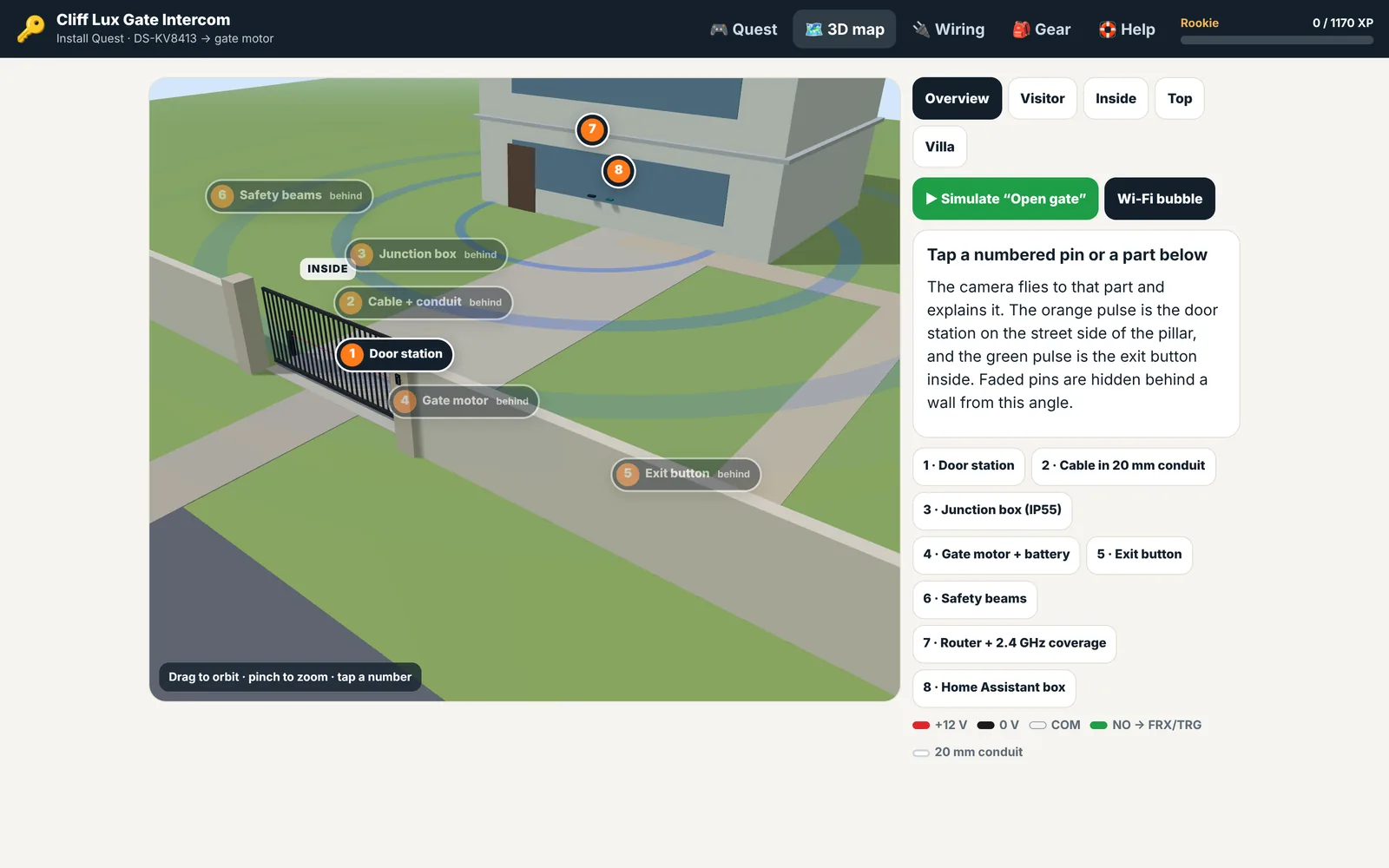
A villa gate built to let guests, staff and cleaners in with nobody on site. The gate motor, video door station and wireless safety beams are installed and working. Villa OS control of the gate, per-booking keypad codes and NFC guest cards are being built now.

DOOR STATIONHikvision DS-KV8413 KEYPADOutdoor · WIP EXIT BUTTONInside the gate SAFETY BEAMSPhoton SMART GATE MOTORCenturion D-series SMARTI/O 1 · TRIGGERCOM · +24 V OUTIRB · CLOSING HIK-CONNECTCloud relay VILLA OSGate control · WIP NO1/COM1 → I/O 1 BLUETOOTH HIK-CONNECT · REMOTE OPEN PER-BOOKING CODES · IN PROGRESS OPEN GATE
Wired · liveWirelessIn progress

BOSBill of systems

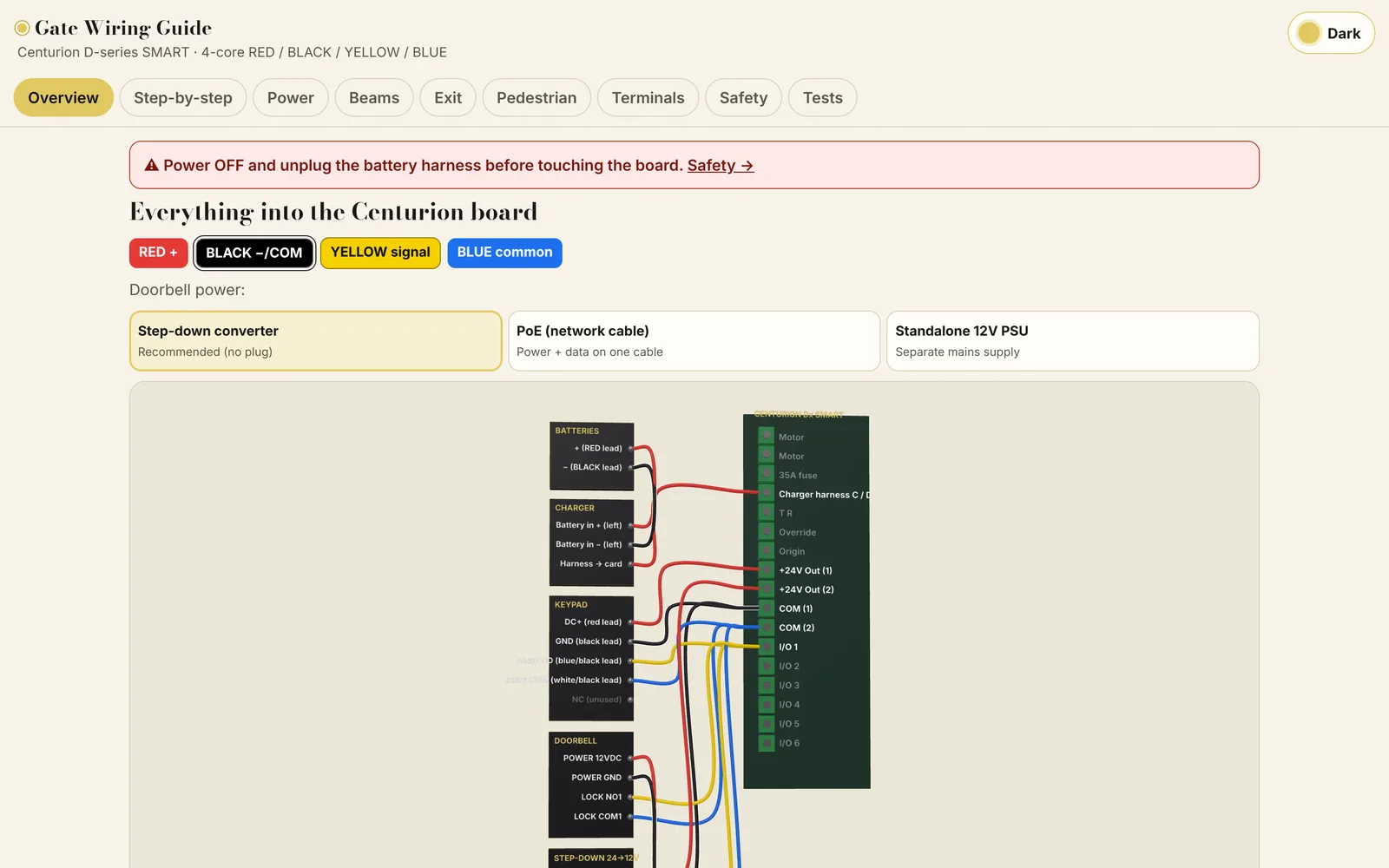
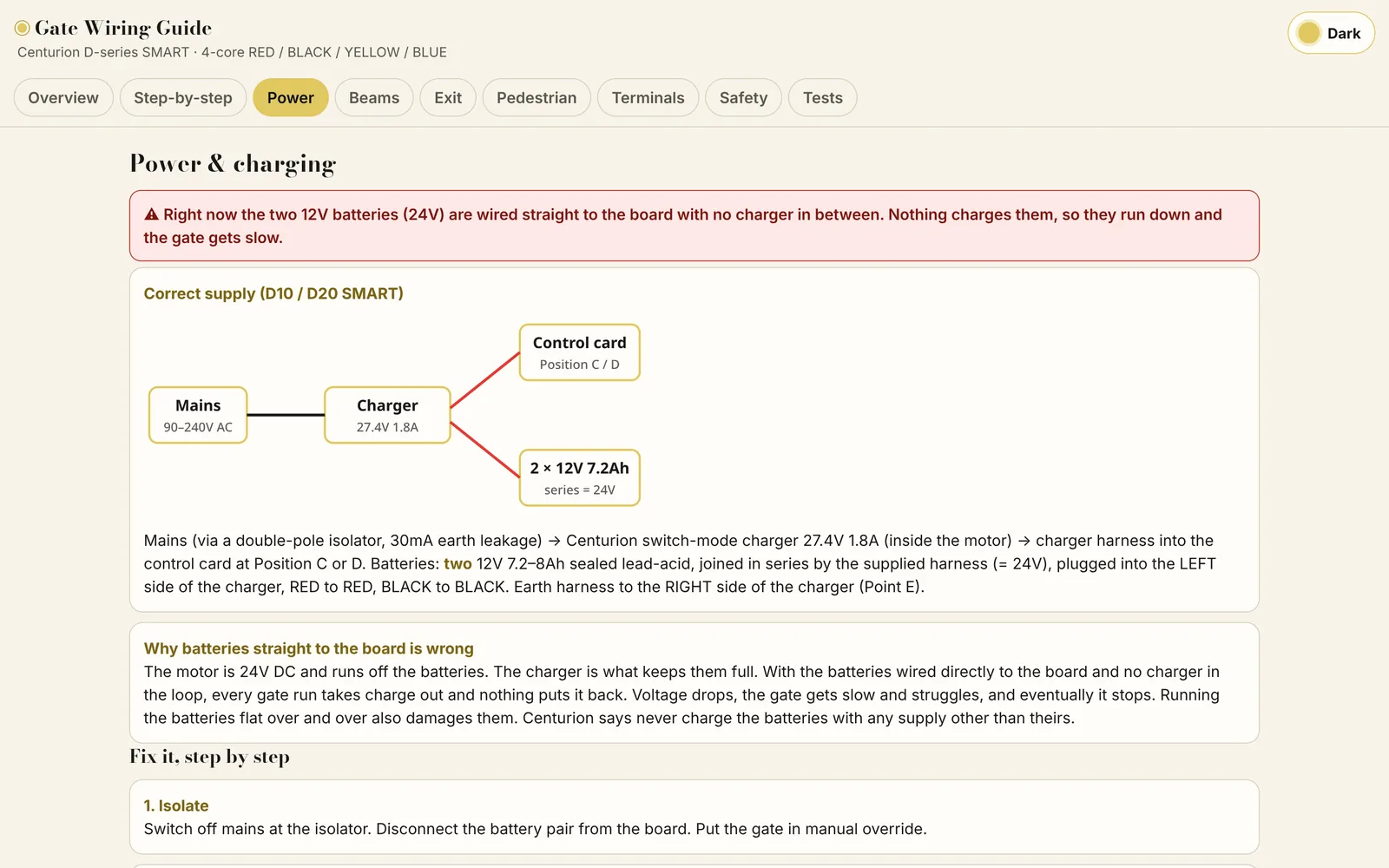
  • DriveCenturion D-series SMART gate motor. Every input lands on its I/O and COM terminals.Installed
  • Video intercomHikvision DS-KV8413 door station. Its door relay (NO1/COM1) pulses the motor's trigger input, so the gate opens from the Hik-Connect app.Installed
  • SafetyCenturion Photon SMART beams, battery powered, paired to the motor over Bluetooth as a closing beam. No wiring to the board.Installed
  • KeypadOutdoor code keypad on its own 4-core run, powered from the motor's 24 V output and sharing the trigger input with the door station.In progress
  • Villa OS controlAn Open Gate button in Villa OS through Hik-Connect, with a typed confirm, a 10-second gap between pulses and an audit log. Per-booking keypad codes that expire at checkout.In progress
  • CredentialsCR80 NFC/RFID guest and floor access cards, designed and printed in-house on a Zebra ZXP Series 3 card printer.In progress

UIThe software, on device
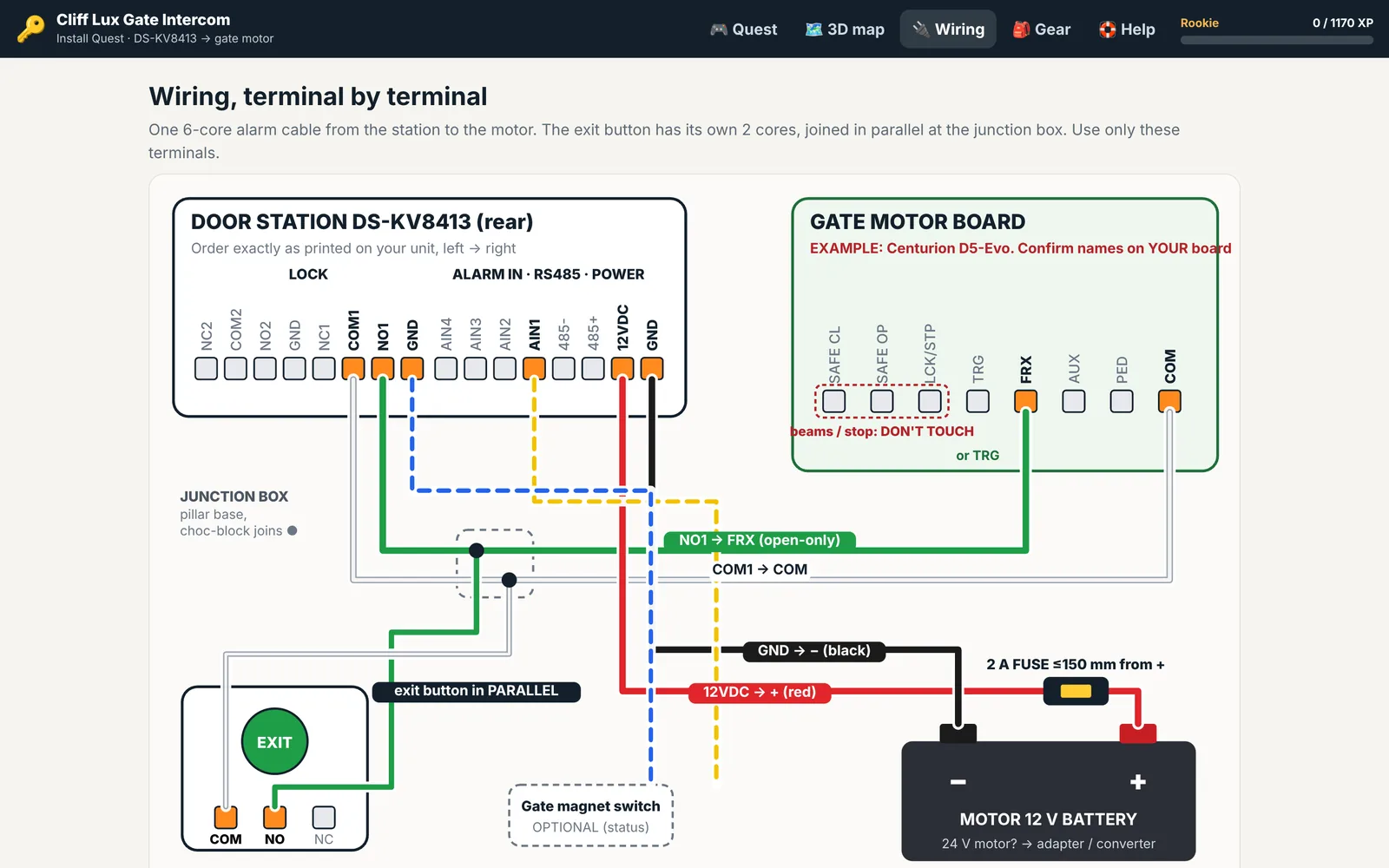
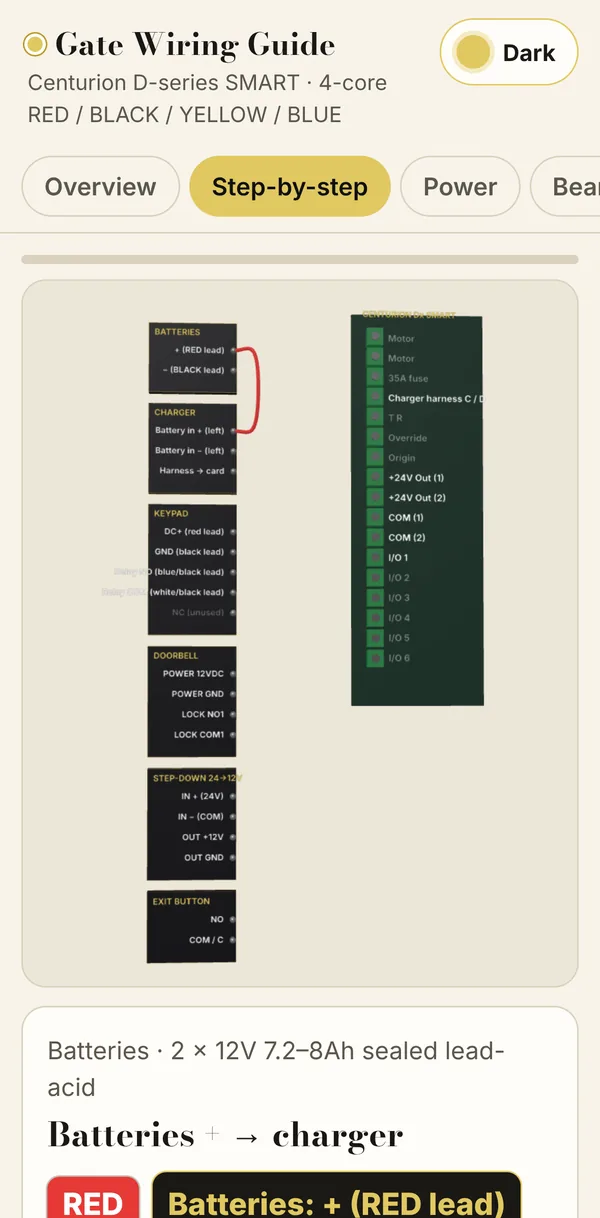
Install quest: gate wiring diagram, desktopInstall quest: 3D map of the gate, desktopWiring guide: Centurion board overview, desktopWiring guide: power and battery step, desktop
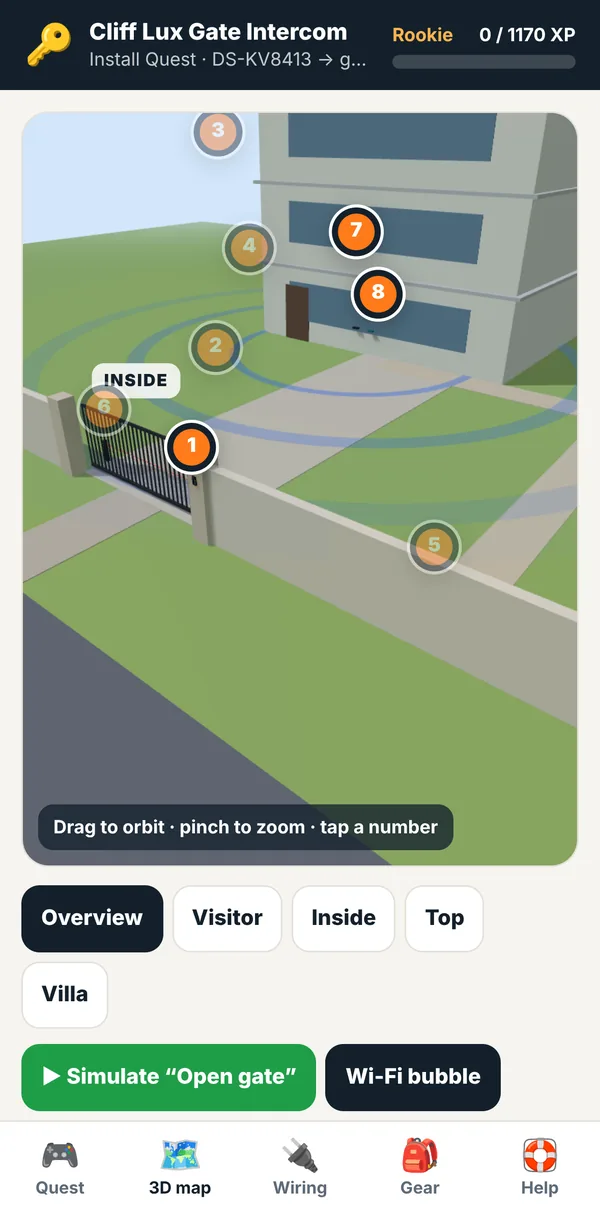
Install quest 3D gate map on iPhone
Wiring guide step-by-step on iPhone

iPhone: 3D gate map · Step-by-step wiring
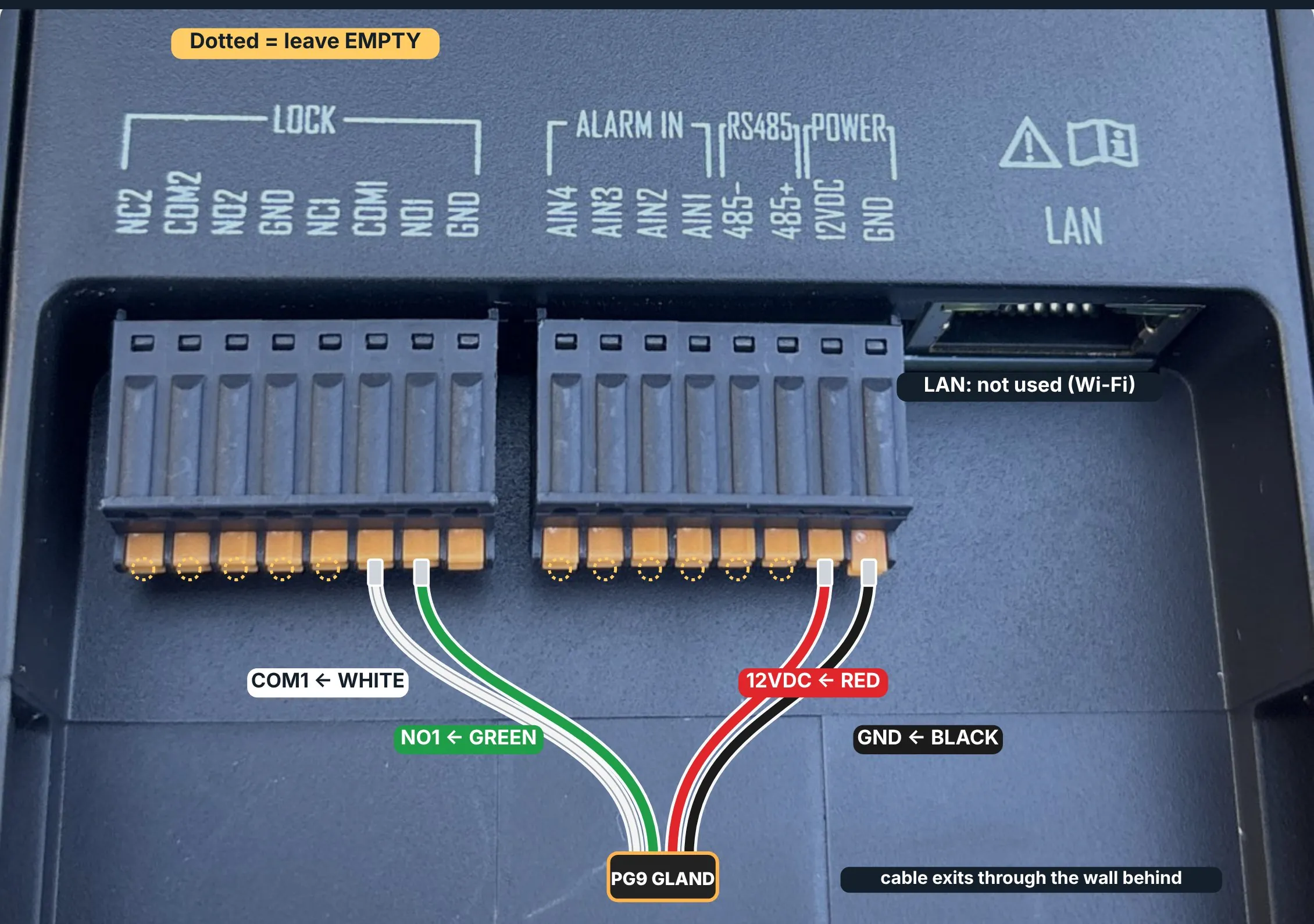
Hikvision door station terminal block as wired on site, with the relay, power and ground cores labelled
Field photo · Cliff LuxDoor station terminals, wiredNO1 and COM1 to the gate motor trigger, 12 V DC in, through a PG9 gland. This is the doorbell trigger that is live today.

Mission 02RinseLaundry operations

Tag-tracked
laundry

Software builtSite live

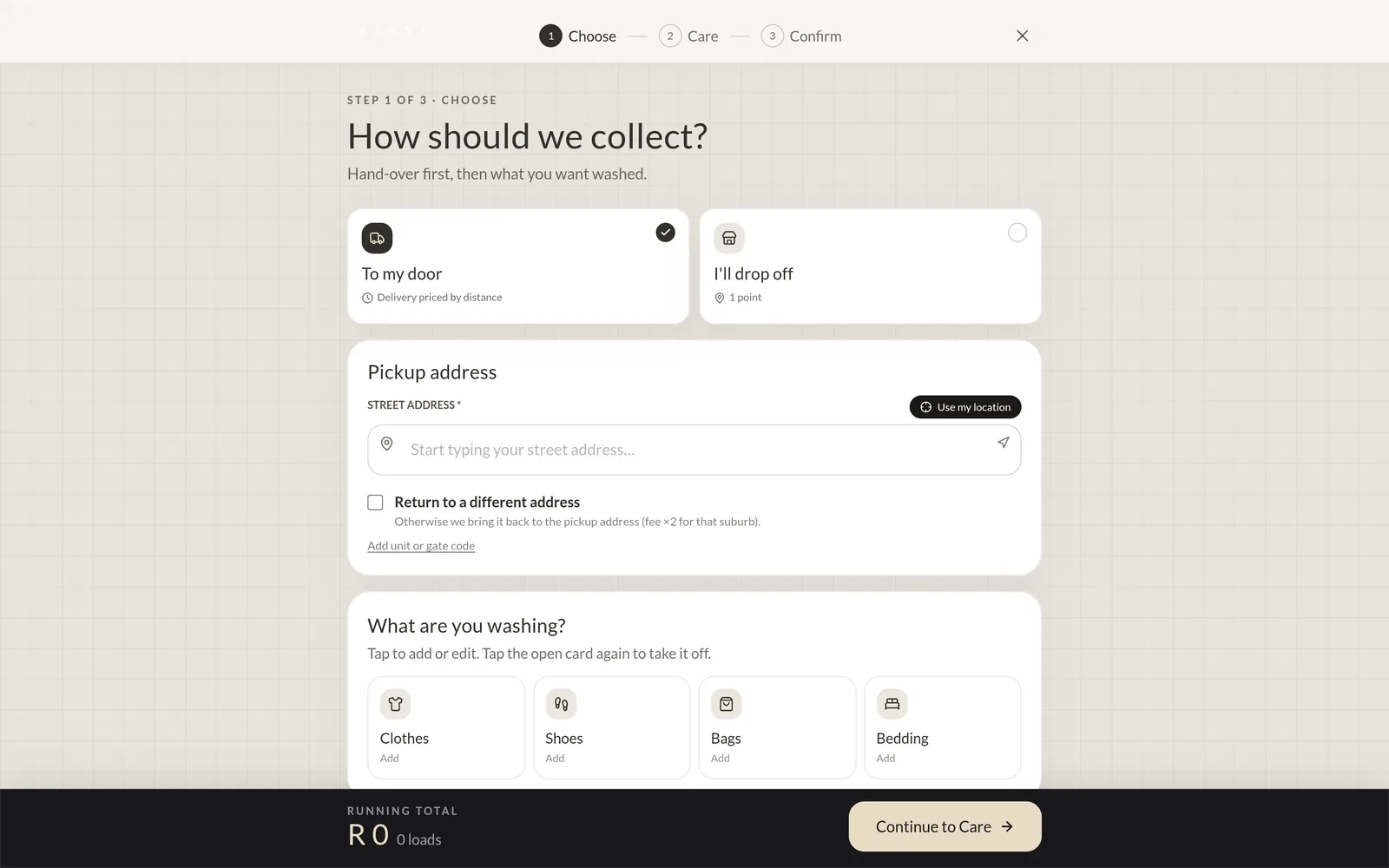
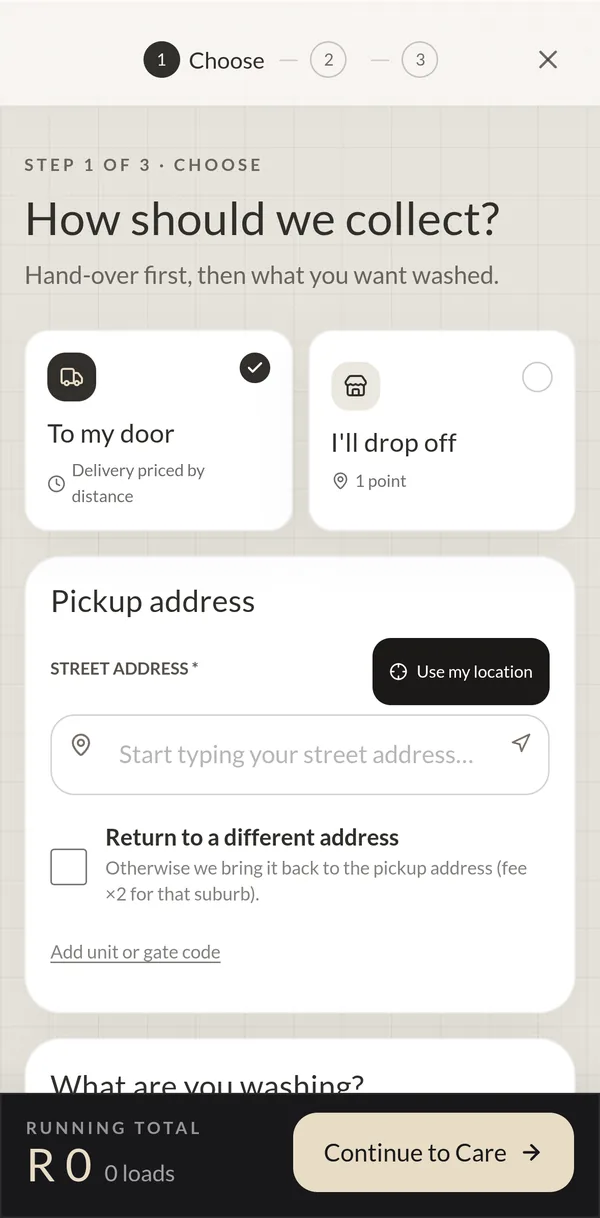
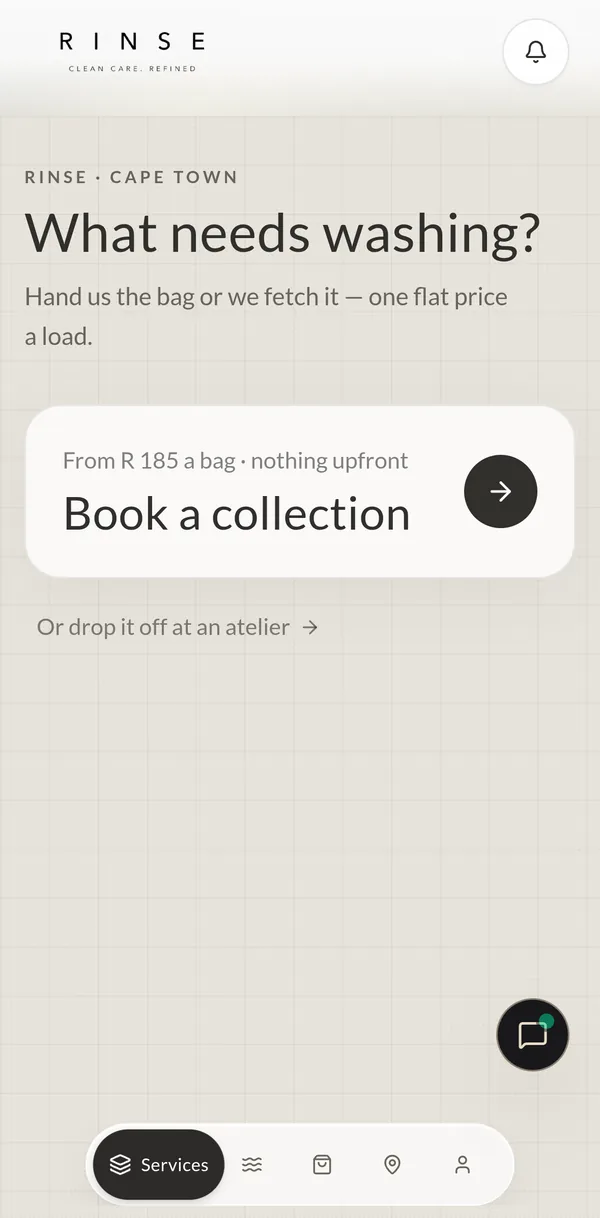
Laundry software that talks to the hardware on the counter. Each order gets a printed QR laundry pass, staff scan it with a phone camera to move it through every stage, and receipts print on a thermal printer through a serverless print proxy.

rinselaundries.co.za
  1. 01TagQR laundry pass, printed as a 58 mm, 80 mm or 4×6 sticker
  2. 02ScanLive camera scanner advances the order a stage
  3. 03TrackEach order's stage on the staff dashboard
  4. 04PrintEpson TM-m30II receipts through an ePOS print proxy
  5. 05ClockStaff clock in and out at a kiosk

UIThe software, on device

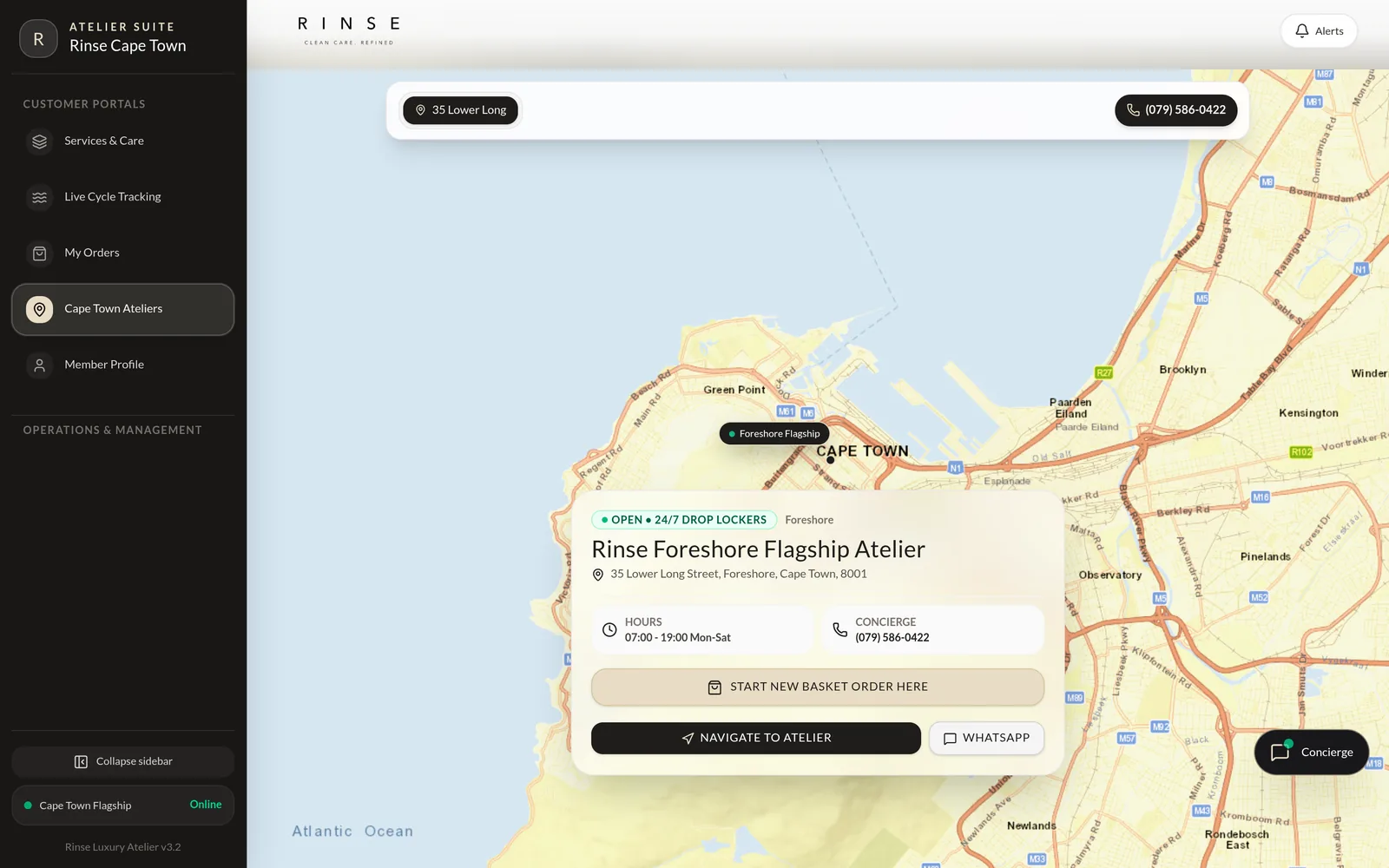
Rinse home page, desktopRinse booking flow, desktopRinse locations map, desktop
Rinse booking flow on iPhone
Rinse services page on iPhone

iPhone: Book a collection · Services

033D design & CAD

From mechanisms
to fine jewellery.

We model parts that have to fit: drive trains, sensor housings and fine jewellery, drawn to real dimensions. Exploded to check every part, sectioned to check every wall.

  1. 01Fine jewellerySolitaire & signet
  2. 02MechanismPlanetary gearbox · 5:1
  3. 03EnclosureSealed sensor housing

Illustrative models, rendered live in your browser

04Capabilities

Six disciplines in one team, so nothing gets lost between the drawing, the board and the code. Built for property owners, hospitality and operations teams, and anyone with a machine that has to move, sense or report.

Parts, assemblies and mechanisms modelled in CAD, designed to be made, fitted and serviced, from brackets and enclosures to drive trains.

  • CAD assemblies
  • Enclosures
  • Mechanisms
  • Jewellery CAD
  • Drawings

Microcontroller boards, sensors, relays, motor drivers and power, plus the firmware that ties them together and the wiring that survives outdoors.

  • Embedded firmware
  • Sensors & relays
  • Power & wiring
  • Access hardware

Feedback loops, motion profiles, interlocks and safety logic, so movement is smooth, repeatable and stops when it should.

  • Feedback loops
  • Motion profiles
  • Interlocks
  • Safety logic

Arms, actuators, gates and automated rigs, from kinematics to end effector. If it has to move by itself, it belongs here.

  • Kinematics
  • Actuators
  • Automation rigs
  • Gate & door drives

Control software, dashboards, cloud and device integrations, so people can run, monitor and trust the machine from anywhere.

  • Device APIs
  • Dashboards
  • Cloud integration
  • Audit & logging

Quick builds, bench tests, field installs and written guides, iterated until it works outside the lab, not just on paper.

  • Bench tests
  • Field installs
  • Install guides
  • Handover

05Control loop

Feel
the loop.

This arm solves its own inverse kinematics every frame. Move your cursor, or drag on a phone, and it finds the joint angles to reach you. Every machine we build has a loop like this at its core.

θ₁ Shoulder
0.0°
θ₂ Elbow
0.0°
Target
0, 0
State
tracking
Fig. 2 · Two-link IK, live

06Process

How a
build runs.

  1. Rev A

    Brief

    The problem, the site, the constraints and what done looks like.

  2. Rev B

    Design

    Mechanics, electronics and software drawn together, costed before anything is bought.

  3. Rev C

    Build

    A working build, quickly, to prove the mechanism, the wiring and the control.

  4. Rev D

    Test

    Bench and field testing against the spec. Measure, adjust, repeat.

  5. Rev E

    Deploy

    Install, hand over with a written guide, and support it once it is running.

How to engage

Send what has to move, where it is, and a photo or sketch. We'll reply with how we'd approach it, what it involves and what we'd need from you.

07The group

Parent · Software solutionsConsoliderVisit ↗ Applied AINeuroVisit ↗
Mechatronics & softwareParaboliqYou are here

08Contact

Let's build
something
that moves.

Send the problem, a sketch or a photo of the machine. We'll come back with how we'd approach it.